Intro to Databases by Brian Holt
Introduction - Complete Intro to Databases, v2 | Frontend Masters
A complete survey of databases.
Pattern matching: I have this shape of problem and I will use this database to solve for it.
Not a deep dive.
Guide is open source: Complete Intro to Databases v2
Four DB:
- MongoDB
- Postgress
- Neo4j
- Redis
Really stable technologies.
DB Admin from old suffer from using jargon and this course will demystify these concepts.
Schema?
Think of Excel. A header row of a sheet is a good example of what a schema is. JSON's object keys is another example. Add data types to the schema and you got Postgres.
A schema defines the structure of data, similar to columns in a spreadsheet. It specifies the expected fields and their types (like name, city, state) that a row or document should contain. Some databases like Postgres have strict schemas that must be adhered to, while document-based databases like MongoDB are schemaless and allow flexible data structures.
Types of DB
✅ Search Engine -> Postgres can do search natively
🥇Solr: Search engine databases like Solr are placed in front of primary databases to perform sophisticated full-text search operations. They allow search functionality to scale independently from the main database, preventing heavy search loads from affecting database performance. This is useful when you need advanced search features or want to isolate search traffic from your primary database workload.
✅ wide column db -> for scaling a lot data, Facebook developed Cassandra for speed and scale
⚠ a neat way it works is nodes gossip with another to hop data to other clusters.
🥇 They feature multi-master (multi-primary) architecture where you can read and write to various individual nodes that then gossip with each other to spread information. This enables fast read/write latencies across multiple nodes, making them suitable for applications operating at massive scale.
✅ Message brokers -> Kafka throws messages into a queue and then picks them off.
⚠ helpful when have a lot reads and can process a lot of data
↪ used at WP
↪ Message brokers are systems where you throw messages onto a queue for later processing. They are useful when you need to handle many writes but can tolerate some delay before the writes are processed, or when you have events that need to be processed asynchronously. They can scale to process incredible amounts of data.
✅ Multi Model DB: JSON and SQL together
ACID treated as gospel for many in DB world. Great for safety such as bank transactions or health records
ACID stands for atomic operations, consistent, isolated, and durable
Certain technologies trade safety for speed, performance, or cost.
↪ memcache is not durable by design as it focuses on speed
normalization
Say your business is "Dave's Piano Service" and you have 312 clients. In one giant table, that business name is typed out 312 times. Now you rebrand. You update 312 rows, and if 3 of them fail halfway through, you now have a database that disagrees with itself about your own company's name. That's not a hypothetical — that's Tuesday.
So instead: store each fact exactly once, and point at it. Your business lives in
accounts— one row, one name. Every client just carries a reference to it. Rebrand? Change one row. Done.That's the heart of relational databases. It's why "relational" is in the name, and the idea of store it once, reference it everywhere is called normalization.
SQL
A NoSQL database is more like a folder full of documents, such as markdown files or JSON files. This is different from a relational database which is structured like spreadsheets with defined rows and columns. MongoDB is an example that models its files in this document-based way.
The secret power of relational databases is that they make it really easy to associate things with each other. They are specifically geared towards describing relationships between rows in different tables, such as linking a user in one table to their posts in another table.
Don't change schema if you can avoid it.
Changing the schema is expensive because when you add a new column to a database, you have to add it to the table definition and then either add data for that column to all existing rows or leave it empty. This affects all the existing data in the database.
pgvector container?
The pgvector container is the normal Postgres container with the pgvector extension already pre-installed. It provides the same functionality as the standard Postgres container but eliminates the need to manually install the pgvector extension
A database is a group of tables that are associated with each other, similar to an entire spreadsheet file. A table is like one tab within that spreadsheet, containing rows and columns. Databases provide hard separation between different sets of data, while tables exist within a database.
In creating a table and adding a record or running a query, in practice you don't need to know the underlying model:
INSERT INTO users (username, email, full_name) VALUES ('btholt', 'lol@example.com', 'Brian Holt');"insert clauses"
NOT NULL?
NOT NULL means the column must have a value provided - the user cannot create a record without providing data for that column. If they don't provide the required value, the query will fail with an error.
UNIQUE?
A column with UNIQUE constraint cannot have duplicate values across different rows. For example, emails should typically be UNIQUE so two users can't have the same email. Columns without UNIQUE can have duplicate values, like full names where multiple people might share the same name.
Default Constraints?
The DEFAULT constraint specifies a value that will be automatically assigned to the column if the user doesn't provide one when inserting a record. For example, DEFAULT CURRENT_TIMESTAMP automatically sets the column to the current time if no value is provided.
What does 'PRIMARY KEY GENERATED ALWAYS AS IDENTITY' mean in a table definition?
It creates an auto-incrementing primary key that starts at 1 and counts upward automatically. This replaces the older SERIAL syntax and is the SQL standard way of creating auto-generated unique identifiers for each row.
Query DB
Sample DB: complete-intro-to-databases-v2/public/sample-postgresql.sql at main · btholt/complete-intro-to-databases-v2 · GitHub
Copy Raw and paste into postgres instance
instead of select all users,
SELECT * FROM users;limit to 10
SELECT * FROM users LIMIT 10;❗Name your columns. When you are doing queries and a column does not exist, it fails. Fail now is to fail quickly. DataDog then can pick it up.
Explicitly naming columns is recommended because it makes code self-documenting, causes queries to fail loudly if expected columns are missing, and reduces the amount of data transferred across the network, potentially saving on egress and ingress costs. The wildcard
*is better suited for exploratory work rather than production code.
SELECT username, user_id FROM users LIMIT 10;Named filter rows or projections
SELECT username AS cool_users, user_id AS j_uids FROM users LIMIT 10;this allows for making JOINS a little easier
Finding specific records => WHERE
SELECT username, email, user_id FROM users WHERE user_id=67;filtering for last_login is NULL
SELECT username, email, user_id FROM users WHERE last_login IS NULL LIMIT 20;Looking up users who put in a delete requests for their accounts 6 months ago; Date Math
SELECT username, email, user_id FROM users WHERE last_login IS NULL AND created_on < NOW() - interval '6 months' LIMIT 10;Wrong order of clauses will break the query. Ask LLM to solve for you
Aside: The db was empty and did not know why. It appear that it was not saved to disk. So i referred this section: Querying Postgresql – Complete Intro to Databases v2 in the doc and downloaded the sample db and copied and pasted it into my postgres CI
# is like length of a array
SELECT COUNT(*) FROM users;
Count, update, and delete queries
Users that have ever logged in?
SELECT COUNT(last_login) FROM users;What updates look like:
UPDATE users SET last_login = NOW() WHERE user_id=1;

UPDATE users SET last_login = NOW() WHERE user_id=1 RETURNING *;

UPDATE users SET full_name = 'David Pham', email = 'dpham@example.com' WHERE user_id = 2 RET
An aggregation is an operation that takes multiple rows and condenses them down into fewer rows or a single answer. For example, using COUNT() to get a total count instead of returning all individual rows is an aggregation.*
How do you update a single field in a SQL table for a specific row?
Use the UPDATE statement with SET to specify the new value and WHERE to identify the row. For example: UPDATE users SET last_login = NOW() WHERE user_id = 1;
The RETURNING clause returns the affected row(s) after the operation completes. For example, UPDATE users SET full_name = 'John' WHERE user_id = 2 RETURNING *; will return the updated row with all its fields.
In SQL, string literals should always use single quotes. For example: UPDATE users SET full_name = 'Brian' WHERE user_id = 1;
Foreign Keys
Actually boys will chime in and say the following: don't use foreign keys because they have a performance overhead
A foreign key is a reference in one table that corresponds to a primary key in another table. It establishes a relationship between tables. For example, a user_id in a comments table that references the user_id in a users table creates a foreign key relationship, indicating that the comment belongs to that user.
A foreign key is a column that holds another table's primary key. But — and this is the part that makes it powerful — it's also a promise the database enforces.
Think of a coat check. Your ticket has a number that points to a coat. A foreign key is that ticket, except the coat room is run by someone militant: they will not let you create a ticket for a coat that doesn't exist, and they won't let anyone destroy a coat while tickets for it are still out there. That guarantee is called referential integrity, and you get it for free.
It's true. Using foreign keys has a 10% overhead. However foreign keys provide an affordance in safety at the cost of performance. Its worth it to pay more in server time and such than to have a human go debug something in sql.
Foreign keys maintain data integrity by enforcing that relationships between tables remain valid. They prevent invalid data from being inserted, such as a comment with a user_id that doesn't exist in the users table. This automatic enforcement helps keep data in sync, which is valuable because things that need to stay in sync tend to fall out of sync without enforcement mechanisms.
Whenever you start using the term, "belongs to", thats a good indication that there is a relationship there.
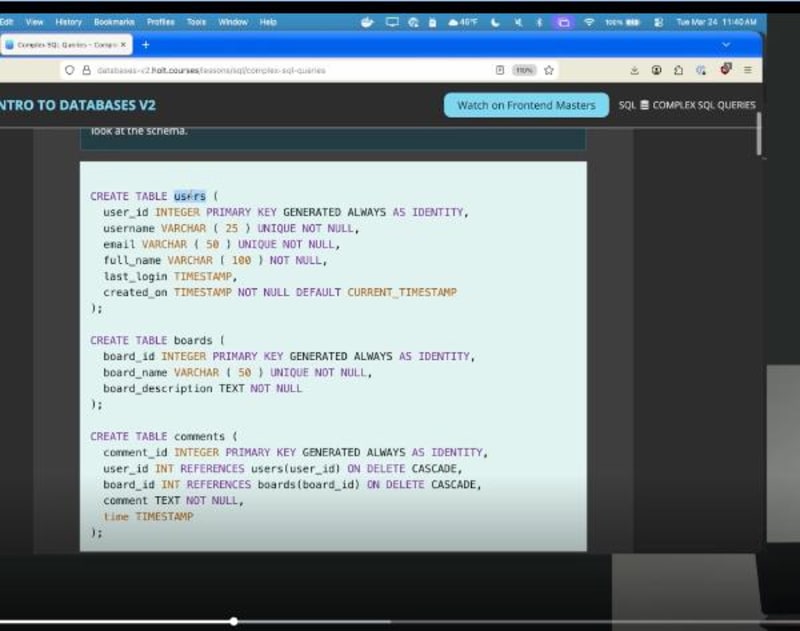
How do we know? REFERENCES keyword.
Why this is cool? If !user_id, its going to fail. With a large amount of data, you want to be sure of the data, e.g. data integrity.
- Also in practice, data sync never stays in sync.
- When we talk about safety and the benefits of it from foreign keys, this is what is meant: data integrity stays whole.
If a comment belongs to user_id and you delete the user, the keyword, CASCADE will make that change on down. So for example, if the user gets deleted, their associated comments (which they belong to the user) also gets deleted.
ON DELETE CASCADE automatically deletes all related records in the child table when the parent record is deleted. For example, if a user deletes their account, all comments made by that user would be automatically deleted as well, rather than causing an error or leaving orphaned records.
ON DELETE NO ACTION which is default means prevents deleting the parent record if there child records associated. For example, deleting a user in this case would mean first, all comments must be deleted first before getting to the user and deleting said user.
ON DELETE NO ACTION prevents the deletion of a parent record if there are related child records. For example, if a user has comments on a message board, attempting to delete that user account would fail unless all their comments are deleted first. This is the default behavior in many databases.
If you want to orphan the comment, then using ON DELETE SET NULL accomplishes that. For example, on Reddit, the comment still exist under the thread, but you will the user is deleted.
ON DELETE SET NULL keeps the child records but sets the foreign key column to null when the parent record is deleted. This effectively orphans the child records. For example, if a user is deleted, their comments would remain but the user_id field would be set to null, indicating the comment is no longer associated with a user.
TEXT means varchar with no cap
JOINs
Joins - Complete Intro to Databases, v2 | Frontend Masters
INNER JOINs are what matters to us. There other joins, but you will find yourself doing INNER JOINs most frequently (80% of the time), but sometimes it's a LEFT JOIN and one in a while, RIGHT JOIN.
LEFT JOIN
if it exists in table A, also include that
RIGHT JOIN
Give me users that have no comments, which does not make sense you would that.
OUTER JOIN
I want that exist on either tables but have no any intersections.
Essentially JOINs are done by matching keys and filtering e.g. WHERE
It's a useful mental model to think from biggest set to smallest set.
Watch out for CROSS JOIN because it give you back every combination of tables and that would mean between 2 tables with 1,000 rows each, you will get 1 million records back. It's explosive.
NATURAL INNER JOIN?
There is no ON clause. Don't ship NATURAL JOINS because without ON clause it becomes less clear what is happening.
What SQL function can be used to display only the first 20 characters of a comment field as a preview?
The LEFT function can be used with the syntax
LEFT(comment, 20)to retrieve the first 20 characters of a comment. This can be projected using an alias likeAS previewto make it easier to reference in the result set.
Why is it necessary to prefix columns when joining tables? Clarity matters a lot:
It's necessary to prefix column names with the table name when the column name exists in multiple tables being joined and would be ambiguous. For example, if both the comments and users tables have a user_id column, you need to specify
comments.user_idorusers.user_id. If a column name is unique across all tables in the query, the prefix is optional but often included for clarity.
What is the difference between INNER JOIN and a LEFT JOIN in SQL?
An INNER JOIN returns only rows that exist in both tables where the join condition is met. A LEFT JOIN returns all rows from the left table (the one in the FROM clause) and matching rows from the right table. If there's no match in the right table, the LEFT JOIN still includes the row from the left table with NULL values for the right table's columns.
Really important to double down on this difference.
- Create a flash card for Inner Join
- Create a flash card for Left Join
Subqueries
SELECT
 comment_id, user_id, LEFT(comment, 20)
FROM
 comments
WHEREE TABLE users (
 user_id = (SELECT user_id FROM users WHERE full_name = TY,
'Maynord Simonich');


 comment_id | user_id |         left
------------+---------+----------------------
         58 |      40 | Has anyone successfu
        156 |      40 | HTTP 204 No Content
        201 |      40 | We moved our job que
        257 |      40 | You don't need React
(4 rows)
example of subquery:
 user_id = (SELECT user_id FROM users WHERE full_name = TY,
'Maynord Simonich')
you definitely can write this subquery as a join, but can be wildly complex joins. ( ... ) means launching into subqueries
While you can get away with probing a database an be inefficient, or for a one time report, if you are putting together authentication, and the DB is hit a lot, its important to set up efficient queries.
But what if you want to count the number of a comments per board ( just like NSS sql report for most views by author in a given time frame)
SELECT
  boards.board_name, COUNT(*) AS comment_count
FROM
  comments
JOIN
  boards
ON
  boards.board_id = comments.board_id
GROUP BY
  boards.board_name
ORDER BY
 comment_count DESC
LIMIT
  10;
Think of GROUP BY as collapsing a large data set into a smaller data set.
To see the least popular leader boards, you can do ASC instead of DESC, but what about you getting a 0's for the boards? No comments means it won't show up in the result. So how about we put a condition, like greater than or equal to 1? How do we fix this?
We had left join from comments with boards joining in. We are looking for boards with no comments. So this means we are going to do a RIGHT JOIN
*The ON clause is the join condition — it tells the database how to match rows between the two tables.
In your query:RIGHT JOIN boards ON boards.board_id = comments.board_id
This means: "For each row in comments, find the matching row in boards where the board_id values are equal."
Think of it like a key-lock pairing:
comments.board_idis a foreign key — it stores which board a comment belongs toboards.board_idis the primary key — the unique identifier of each board
So ON boards.board_id = comments.board_id links the two tables together by that shared ID, so you can pull board_name from boards alongside the comments that belong to it.
Since you're using RIGHT JOIN, all boards are included even if they have zero comments — which is why comment_count might be 0 for some rows rather than those boards being excluded entirely.*
When we run this query, we get a null row returned,
Runtime Roundup | 1and it's because our query COUNT(*) and counts the null row as 1. How do we fix that? Count unique comment_id, e.g. COUNT(comment_id)
Being skeptical of data results is important. A LLM can do the heavy lifting and your ignorance to the nature of the database and the data it holds will lead you to believe that the results are accurate.
Can do multiple aggregations too.
subqueries
Often subqueries can be written as joins but will introduce complexity at the cost of efficiency
- optimize subqueries when slow down is expensive and it something like a report on user behavior. If it's probing a db or a one-off, who cares. let it run for a long time.
- as a reminder, this is an aggregation: you want to condense a large amount of things into something smaller.
Example,intro-to-db-with-bholt/subqueries.sql
-- To see the least popular leader boards, you can do `ASC` instead of `DESC`, but what about you getting a 0's for the boards? No comments means it won't show up in the result. So how about we put a condition, like greater than or equal to 1? How do we fix this?

-- We had left join from comments with boards joining in. We are looking for boards with no comments. So this means we are going to do a RIGHT JOIN

SELECT
  boards.board_name, COUNT(*) AS comment_count
FROM
  comments
RIGHT JOIN
  boards
ON
  boards.board_id = comments.board_id
GROUP BY
  boards.board_name
ORDER BY
 comment_count ASC
LIMIT
  10;
Think about GROUP BY collapsing a bigger set to a smaller set.
A subquery is a query inside of another query. The subquery runs first, and its result is then used by the outer query. It's useful when you need to reference data from your database but don't have a direct way to get it in a single query.
When using the = operator with a subquery in SQL, what requirement must the subquery result satisfy?
When using the = operator, the subquery must return exactly one value. If it returns zero rows or multiple rows, the query will error. To handle multiple results, you need to treat it as a set using operators like IN instead.
What is the difference between using INNER JOIN and RIGHT JOIN when finding boards with no comments?
An INNER JOIN only returns results where matches exist in both tables, so boards with no comments would be excluded. A RIGHT JOIN includes all records from the right table (boards) even if there are no matching records in the left table (comments), allowing boards with zero comments to appear in the results.
Why does a board with no comments show a comment count of 1 when using COUNT(*) with a RIGHT JOIN?
Because COUNT(*) counts all rows in the result set, including rows with NULL values. When a board has no comments, the RIGHT JOIN still creates a row with NULL comment values. To get an accurate count of zero, you should use COUNT(comment_id) instead, which only counts non-NULL values.
What is the purpose of the GROUP BY clause in SQL aggregations?GROUP BY collapses a larger set of data into a smaller set by grouping rows that share common values. It's used when performing aggregations like COUNT, allowing you to condense multiple rows into summary statistics for each group.
MongoDB
Schemaless DB
JSONB
Planes, Cars, and Trucks types in a table wont make sense. A message board can be media rich objects like videos, text, image and audio.
JSONB query is pretty good now. They did a lot work on it to be efficient how its stored.
Almost want to use JSONB
anything you can do with JSON you can do here, with JSONB.
You can next as much as you want.
postgres=# SELECT content['type'] FROM rich_content;
 content
---------
 "poll"
 "video"
 "poll"
 "image"
 "image"
(5 rows)
this may look like a string but it's a JSONB data thing. You can't do string methods until you cast it.
why does this matter. It's still JSON, if you want dimensions all of it.
SELECT DISTINCT content['type'] FROM rich_content;
 content
---------
--  "image"
--  "poll"
--  "video"
-- (3 rows)

SELECT DISTINCT content ->> 'type' FROM rich_content;
 ?column?
----------
--  video
--  poll
--  image
-- (3 rows)

SELECT content ->> 'type' AS content_type, comment_id
FROM rich_content
WHERE content ->> 'type' = 'poll';

-- content_type | comment_id
-- --------------+------------
--  poll         |         63
--  poll         |        104
-- (2 rows)

-- if i use different notation and mix them together, it will get mad at me:
SELECT content ->> 'type' AS content_type, comment_id
FROM rich_content
WHERE content['type'] = 'poll';

-- LINE 3: WHERE content['type'] = 'poll';
--                                 ^
-- DETAIL:  Token "poll" is invalid.
-- CONTEXT:  JSON data, line 1: poll


SELECT
  content -> 'dimensions' ->> 'height' AS height,
  content['dimensions'] ->> 'width' AS width,
  comment_id
FROM
  rich_content;

--    height | width | comment_id
-- --------+-------+------------
--         |       |         63
--  1080   | 1920  |         71
--         |       |        104
--  400    | 1084  |        201
--  237    | 3301  |        274
-- (5 rows)
what if query for polls?
what about dimensions? Images have dimensions
to pull out of the width, it useful to use the notation:content['dimensions'] ->> 'width' AS width,
JSONB (where B stands for binary) is more efficient in how it stores data, while JSON stores data as a straight-up string. In most cases, JSONB should be used rather than JSON for better performance and functionality.
What is the difference between using a single arrow (->) and double arrow (->>) when querying JSONB columns in Postgres?
A single arrow (->) returns data as a JSON type, maintaining the JSON format. A double arrow (->>) returns the actual string value. The double arrow should be used when you need to get the final string value out of the JSONB column, especially for comparisons or filtering.
What would happen if you try to compare a JSONB field value using a single arrow operator to a string literal in a WHERE clause?
SELECT * FROM rich_content
WHERE content->'type' = 'poll'
This query will fail because the single arrow (->) returns a JSON type, not a string. You cannot compare a JSON type directly to a string literal. You need to use the double arrow (->>) to get the string value: content->>'type' = 'poll'
Why might you need to cast JSONB values when filtering numeric data in a WHERE clause?
Everything returned from JSON is treated as a string because JSON does not have inherent types. To filter by numeric comparisons (like finding images with height greater than 1000), you must cast the JSONB value to an integer type before comparison.
Why might you need to cast JSONB values when filtering numeric data in a WHERE clause?
Everything returned from JSON is treated as a string because JSON does not have inherent types. To filter by numeric comparisons (like finding images with height greater than 1000), you must cast the JSONB value to an integer type before comparison.